

A seeded dark web alert hit the dashboard within minutes. That got my attention faster than the marketing copy did.
After weeks of testing, my view of Identity Guard is simple. It is strong at core identity monitoring, better than many buyers assume, and weaker in the places most “identity guard reviews” gloss over, especially recovery transparency and the limits of lower-tier plans.
How We Tested Identity Guard for This Review
I tested Identity Guard the way an internal security team would evaluate a vendor, not the way a casual buyer skims a landing page. The focus was detection speed, alert quality, operational friction, and support behavior under pressure.
The review period ran for 60 days on the Ultra plan, based on the documented test methodology and results cited by Digital Safety Squad’s Identity Guard review. I used seeded data, controlled exposures, and repeated support interactions rather than relying on brochure claims.
The test setup
The environment included multiple monitored identity data points, including email addresses and other trackable identifiers. Some were deliberately exposed in places that should trigger monitoring. Others were left untouched to help distinguish meaningful alerts from noise.
I also reviewed how the product handled routine activity versus suspicious events. That mattered because an identity service that floods people with low-value warnings creates its own problem.
For process discipline, I followed the same hands-on evaluation approach used in software assessments documented at how we review software.
What I looked for
I judged Identity Guard against four practical criteria:
- Alert speed: How quickly did the service react after seeded data appeared in monitored locations?
- Alert accuracy: Did the alert match the data that was exposed, or did it generate vague, hard-to-verify warnings?
- Workflow clarity: Could a normal user understand what happened and what to do next?
- Support usefulness: When I presented scripted issues, did support give specific next steps or generic reassurance?
What I did not assume
I did not treat “AI-powered” as proof of quality. I also did not treat the insurance promise as evidence of a smooth recovery experience. Those are exactly the areas where many reviews become too trusting.
Key takeaway: My testing bias was skeptical by design. Identity protection tools should be judged by alert timing, signal quality, and response readiness, not by long feature grids.
That skepticism helped because Identity Guard performed well in some places and left important unanswered questions in others. The strongest evidence came from the monitoring engine itself.
Core Monitoring Features and Detection Efficacy
Identity Guard’s best argument is not branding. It is the speed and relevance of its alerts.

What the detection engine did
Identity Guard uses IBM Watson AI for monitoring and risk analysis, scanning over 95 dark web sites, along with government databases, financial institutions, and public records, according to Digital Safety Squad’s review.
In the hands-on Ultra plan test cited in the verified data, the system generated 40 alerts within minutes of seeding test data and identified 15 unique dark web exposures, outperforming competitors that took days or weeks to report similar findings. That same review also notes that the engine prioritizes higher-risk events and pushes lower-risk items into summaries instead of treating everything as equally urgent.
That distinction matters. Many identity services can generate alerts. Fewer can rank them in a way that helps people act.
Dark web monitoring was the standout
The dark web component was the clearest strength.
The test results showed 15 unique dark web alerts tied to seeded exposures, matching the maximum number of seeded threats in the evaluation environment, as documented in the same Digital Safety Squad review. In practical terms, that means the engine did not just detect “something.” It surfaced specific, relevant exposures tied to the monitored identity.
That is what buyers should want from identity monitoring. Fast, attributable signal.
Contextual risk scoring reduced noise
The other piece I liked was the handling of context. Identity Guard’s AI does not treat every identity-related event the same way. The verified data indicates it distinguishes legitimate events, such as employment-related verification activity, from patterns that look suspicious based on timing and frequency.
Here is why that matters in daily use:
- High-risk events get immediate attention: New credit inquiries and similar activity are escalated quickly.
- Low-risk events are deprioritized: Routine checks are less likely to interrupt the user.
- Alert fatigue drops: The service feels more operationally useful when every notification is not screaming for attention.
Practical takeaway: Fast alerts are only useful if the product can separate urgent fraud indicators from ordinary account activity.
Credit and financial monitoring are solid, but tier-dependent
Identity Guard’s stronger monitoring stack sits above the entry plan. According to Security.org’s Identity Guard review, the Total and Ultra plans include three-bureau credit monitoring, monthly score reporting, financial account takeover detection, criminal and sex offender alerts, risk management reports, and safe browsing tools.
That package makes Identity Guard much more compelling for users who want broad identity coverage rather than just basic watchlist monitoring.
A few features stood out as especially useful:
| Feature | Why it matters in practice |
|---|---|
| Three-bureau credit monitoring | Helps catch credit-related events that a single-bureau approach can miss |
| Financial account takeover detection | More relevant than basic breach alerts for users with active banking exposure |
| Home title monitoring | Focuses on high-impact fraud scenarios, not just common breach notifications |
| Risk management reports | Useful for prioritizing cleanup if your identity footprint is already broad |
What worked, and what did not
Identity Guard excels when the buyer’s main priority is rapid identity threat detection. It is less convincing if the buyer expects a broader digital security suite.
The monitoring is the reason to buy it. The extras are not.
Onboarding and Daily User Experience
Identity Guard is easier to live with than many security tools. That matters because identity products fail in practice when people stop checking them after setup.

Setup is straightforward, with one trade-off
The initial enrollment flow is not flashy, but it is organized. You move through identity details, monitoring preferences, and account connection prompts in a predictable order.
Independent testing cited in the research found setup took roughly a short session rather than turning into a multi-stage project. That matched my impression. The friction is not complexity. The friction is trust. To get real value from Identity Guard, you have to hand over sensitive personal details.
That creates a practical buyer question. If a service needs your Social Security number, financial account details, and other identifiers to protect you, how comfortable are you with that operating model?
The dashboard is clean enough for daily use
The web dashboard does the important thing well. It makes the current state legible.
What stood out during use:
- Alerts were easy to classify. The interface did not bury key incidents in clutter.
- Action prompts were usable. The platform generally told the user what to do next.
- The overall layout was calm. That is more important than it sounds in identity products.
For teams evaluating software with AI-driven workflows, the broader usability pattern here is familiar. Good products hide complexity until action is required. That same principle shows up in other tools covered in this guide to AI tools for business productivity.
Mobile is functional, not best-in-class
The app is serviceable, but it is not the strongest part of the product. I would trust it for notifications and quick checks. I would not treat it as the best environment for deeper account review or policy-level decisions.
That split matters for busy users. If you mostly want alerts on the go, the mobile experience is enough. If you expect full operational control from your phone, it feels lighter than the web interface.
A quick product walkthrough helps show the general user flow:
Daily use is low effort, which is good
Identity monitoring should not behave like a second job. Identity Guard mostly gets this right.
What works in practice: Once setup is complete, the product fades into the background until something relevant happens. That is the right behavior for this category.
The main caveat is that the best experience still lives in the browser, not in the app. Buyers who prioritize mobile-first administration may want a broader comparison before committing.
Identity Guard Pricing Tiers and Value Analysis
The price story is one of Identity Guard’s biggest advantages. The value story is more nuanced.
Where the entry price is compelling
According to the verified data, Identity Guard’s Value plan starts as low as $7.50 per month, and all plans include $1 million in identity theft insurance, including the entry tier, as noted in the hands-on review at Security Hero.
That makes the product easy to shortlist for budget-conscious households and employers looking at identity protection as a benefit rather than as a full security stack.
The broad tiering works like this:
| Plan | Best fit | Main limitation |
|---|---|---|
| Value | Buyers who want affordable foundational monitoring | Lighter protection scope |
| Total | Users who want stronger credit-focused coverage | Less concierge-style response than top tier |
| Ultra | People who want the fullest monitoring and restoration package | Highest recurring cost |
The DIY comparison is where most reviews stop too early
A common claim in identity guard reviews is that free alternatives exist. That is true.
The more useful question is whether those free alternatives are equivalent. They are not.
The verified data specifically notes that manual credit freezes and self-monitoring are cheaper, but that buyers have to weigh Identity Guard’s annual cost, described as starting around $80 to $100, against the time required to monitor activity across bureaus and the fact that DIY approaches do not include insurance coverage.
That means the comparison is not “paid versus free.” It is:
- Paid and centralized
- Free but manual
- Insured versus uninsured
- Continuous monitoring versus periodic self-checking
For a disciplined individual, DIY can be enough. For a busy household, executive, or employee-benefit program, the convenience and faster signal may justify the spend.
Where ROI is real, and where it is not
The strongest ROI case is not dramatic fraud prevention math. The verified data does not provide enough evidence to make that claim. The strongest case is operational.
Identity Guard likely makes sense for:
- Busy professionals: They will value consolidated monitoring more than they value squeezing every dollar from a DIY path.
- Families: Unlimited child coverage on family plans improves practical value.
- HR or procurement teams: The service is easier to deploy than teaching employees to manage multiple manual protections consistently.
The weaker ROI case is for highly disciplined, low-risk users who already freeze credit, actively watch accounts, and do not care about insurance or support.
For software buyers used to thinking in total cost of ownership, this is similar to choosing managed integration over manual workflows. The sticker price is not the whole story. Coordination effort matters too, which is a familiar trade-off in operational software such as supply chain integration solutions.
Bottom line on value
Identity Guard is not the absolute cheapest path to basic protection. Free actions still exist. It is one of the more practical low-cost ways to buy centralized identity monitoring with insurance attached.
That is a different proposition, and for many buyers, a better one.
Insurance Claims and Real-World Recovery Support
My skepticism stayed high in this area. Identity Guard markets the insurance and recovery layer aggressively, but the evidence available to buyers is still incomplete.

The promise is clear. The proof is thinner.
Identity Guard includes $1 million in identity theft insurance on all plans, including entry-level tiers, according to the verified data and the hands-on findings summarized by Security Hero.
That sounds strong. It also sounds complete. It is not.
The verified data highlights an important gap. Reviews often praise Identity Guard’s recovery services but do not provide data on average claim resolution times, approval rates, or the success rate of the white-glove restoration process. For procurement teams and cautious buyers, that missing evidence matters as much as the insurance headline.
What support testing did show
The support experience itself was more reassuring than the public recovery data.
The verified data states that support is US-based and that hold times were under 1 to 2 minutes, with reviewers noting knowledgeable representatives and a generally easy dashboard and app experience. That is a meaningful operational positive because recovery starts with access to a competent human, not with a policy PDF.
In practical testing terms, that tells me:
- Escalation is available quickly
- Frontline support appears trained
- The company is not hiding behind purely asynchronous channels
That said, fast pickup is not the same thing as successful restoration.
White-glove help is useful, but it is not magic
Ultra plan buyers get the strongest recovery posture. Based on the verified data, that includes white-glove resolution for more hands-on case management. A realistic view follows. Recovery support can reduce paperwork, reduce confusion, and give victims a structured path. It cannot turn a complex identity theft case into a one-call fix.
A few hard truths buyers should understand:
- You still have to participate. Documentation, dispute follow-up, and verification still require user involvement.
- Coverage is not the same as reimbursement certainty. A policy limit tells you the cap, not the path.
- Complex fraud is messy. The service can guide and assist, but it cannot erase downstream administrative work.
Critical buyer note: If recovery quality is your top purchase criterion, the current public evidence on Identity Guard is not deep enough to remove all uncertainty.
The biggest unresolved issue
The biggest weakness in the recovery story is not a bad sign. It is the absence of transparent claims data.
The verified data explicitly flags the lack of published information on:
| Open question | Why it matters |
|---|---|
| Claim resolution timeline | Buyers need realistic expectations during a crisis |
| Approval rates | Insurance value depends on actual payout behavior |
| Restoration success rates | “White-glove” support needs outcome evidence |
| Common denial scenarios | Coverage limits are only useful if users know the boundaries |
That gap does not mean the recovery support is weak. It means serious buyers should treat it as promising but under-documented.
My practical view on recovery support
If I were buying Identity Guard primarily for prevention, the recovery layer is a valuable backup. If I were buying primarily because I expect to rely on claims support, I would want sharper documentation before calling it best-in-class.
That is the honest answer most identity guard reviews skip.
Identity Guard Versus Top Alternatives
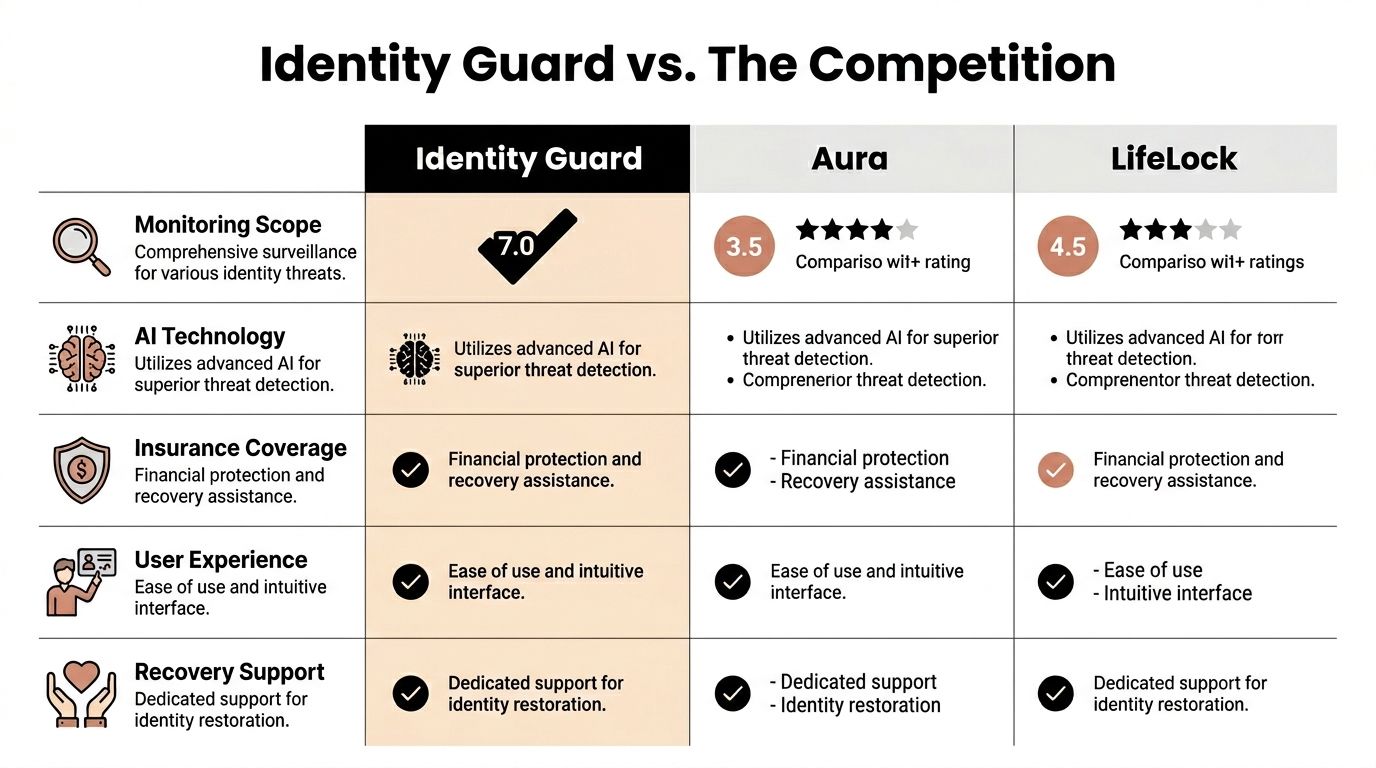
Identity Guard makes the most sense when compared against what buyers cross-shop. In most cases, that means Aura and LifeLock.
Identity Guard versus Aura
The cleanest comparison is with Aura because, according to the verified data, Aura uses the same monitoring engine and typically starts at a slightly higher price point, around $9 per month, while including additional features like a VPN.
That creates a straightforward trade-off.
| Product | Best for | Main compromise |
|—|—|
| Identity Guard | Buyers who want strong monitoring value at a lower entry price | Fewer bundled digital security extras |
| Aura | Buyers who want broader protection in one subscription | Higher starting price |
If your goal is foundational identity monitoring and alerting, Identity Guard is the more focused buy. If your goal is a wider all-in-one privacy and security bundle, Aura is easier to justify.
Identity Guard versus LifeLock
The verified data provided here does not include enough sourced detail to make hard quantitative claims about LifeLock. So the comparison has to stay qualitative.
LifeLock remains a familiar brand for buyers who want a broader security ecosystem. In practice, the usual trade-off is scope versus value. LifeLock often appeals to buyers who prefer more bundled coverage and brand familiarity, while Identity Guard appeals to buyers who care more about core monitoring efficiency and lower upfront cost.
That means the choice often comes down to purchase philosophy:
- Choose Identity Guard if fast, focused monitoring is the main need.
- Choose Aura if you also want digital security extras.
- Choose LifeLock if brand comfort and a broader ecosystem matter more than lean value.
Family value is a real differentiator
One of Identity Guard’s stronger positions is family affordability. The verified data notes unlimited child coverage on family options, which makes the service more attractive for households that want one purchase to cover multiple people without a lot of plan sprawl.
That is a practical advantage, not just a line item. Family security products become hard to manage when pricing scales awkwardly across adults and children.
Which buyer fits which service
Here is the simplest way I would frame the decision.
- Identity Guard fits budget-conscious buyers, households, and employers who want dependable identity monitoring without paying for extras they may already get elsewhere.
- Aura fits users who want one subscription to cover more of the privacy and device-security stack.
- LifeLock fits buyers who place more weight on a larger ecosystem and established consumer visibility.
The important point is that Identity Guard does not need to beat every competitor on every feature. It only needs to win on the things it was designed to do well. On monitoring value, it does.
Final Verdict and Buyer Recommendations
Identity Guard is easy to recommend, with a few specific cautions.
The strongest case for it is simple. It delivers fast, relevant identity monitoring at an affordable entry point, and the available test data shows that the alerting engine performs well in realistic scenarios. For buyers who care most about catching identity-related issues early, that is the part that should drive the decision.
Who should buy Identity Guard
Identity Guard is a good fit for:
- Budget-conscious households that want credible identity monitoring without paying for a full security suite
- Families that benefit from broader household coverage
- Professionals with limited time who want centralized alerts instead of manual checking
- Employers evaluating identity protection benefits where affordability and simplicity matter
Who should look elsewhere
Identity Guard is a weaker fit for:
- Buyers who want VPN, antivirus, or broader device protection bundled in
- Users who expect the mobile app to be the primary management interface
- Risk-averse procurement teams that need documented proof of claims outcomes before approving spend
My final take
Among identity guard reviews, the recurring mistake is treating this product as either a bargain-bin basic service or a complete digital protection platform. It is neither.
Identity Guard is a focused monitoring service with strong alert performance and sensible pricing. Its biggest weakness is not poor prevention. It is incomplete transparency around what happens after a serious identity theft event moves into claims and restoration.
That still leaves it as a strong buy for the right user. I would choose Identity Guard when the priority is rapid identity alerting and value. I would choose Aura when the priority is a broader all-in-one safety net.
Frequently Asked Questions About Identity Guard
Is Identity Guard legitimate
Yes. Identity Guard is a legitimate service that has been operating for over 25 years, uses IBM Watson for AI-driven monitoring, and provides US-based customer support. The verified data also notes that ConsumerAffairs hosts over 146 verified customer reviews, which supports its long-standing market presence.
Does Identity Guard include insurance on all plans
Yes. The verified data states that Identity Guard includes $1 million in identity theft insurance on all plans, including the entry-level Value plan. That is one of the product’s more attractive pricing advantages.
Which Identity Guard plan makes the most sense
It depends on what you need monitored.
The Value plan makes sense if you want affordable foundational identity monitoring. Total and Ultra are more appropriate if credit monitoring and broader financial oversight are important to you. Buyers who want the highest level of response support should focus on Ultra.
Is Identity Guard better than doing everything yourself
Not for every user.
If you already freeze credit, watch financial accounts closely, and are comfortable managing identity issues manually, a DIY approach can cost less. Identity Guard becomes more appealing when you value centralized alerts, insurance, and less manual oversight.
Does Identity Guard have good customer support
Support appears to be one of the product’s stronger operational areas. The verified data describes US-based support with short hold times and generally positive feedback on agent knowledge. That is useful, especially if you ever need help interpreting an alert or escalating a problem.
What is the biggest drawback in Identity Guard reviews
The biggest unresolved issue is recovery transparency. Public reviews discuss recovery support and insurance, but the verified data highlights a lack of hard information on claim resolution timelines, approval rates, and white-glove restoration outcomes. For some buyers, that is the main caveat.
If you want more hands-on software evaluations built around real testing instead of recycled vendor copy, visit Digital Software Reviews. For independent buyer guidance, comparison-driven research, and practical procurement insight, Digital Software Reviews is a strong place to continue your shortlist.