

You are dealing with the same pattern I see in most supply chain software evaluations.
One warehouse is overstocked. Another is short on critical items. Customer service has one ETA, transportation has another, and procurement is still working from a spreadsheet export that is already stale. The vendor demo made everything look clean. Your operation is not clean.
That gap is why choosing among scm software companies is harder than most buyers expect. These platforms can improve planning, partner coordination, and execution. They can also turn into long, expensive integration programs that never replace the workarounds they were meant to eliminate.
The market keeps growing because the need is present. The global SCM software market is projected to grow from USD 21.0 billion in 2024 to USD 52.2 billion by 2033, driven by e-commerce pressure for faster delivery and real-time tracking, according to IMARC Group's supply chain management software market statistics. Growth does not make selection easier. It makes vendor messaging louder.
What matters is not the prettiest dashboard. It is whether the platform can survive your data quality, your ERP constraints, your trading partner exceptions, and the daily reality of replanning when something breaks.
Navigating the Complex World of SCM Software
SCM software earns its keep when the operation gets messy.
A buyer misses a ship date. A supplier changes lead time without warning. Demand shifts faster than the forecast cycle. You need one system to tell planners, warehouse teams, customer service, and finance what changed and what to do next. That is the promise.

The problem is that scm software companies sell breadth, while buyers need fit. A platform can be excellent at planning and weak at partner connectivity. Another can be strong in network collaboration and still leave your internal inventory logic too dependent on custom work.
What buyers usually underestimate
Many teams focus first on features. They should start with operating friction.
- Data friction: Bad item masters, inconsistent supplier records, and duplicate location logic will break forecasting and execution faster than any missing feature.
- Process friction: If each region plans differently, the software will expose that conflict. It will not fix it by itself.
- Integration friction: The hard part is not loading orders once. It is keeping inventory, shipment events, purchase orders, and exceptions synchronized without manual babysitting.
What good selection looks like
The right evaluation asks different questions than a standard demo script.
You need to know how the platform behaves under exception volume, how quickly planners can re-run scenarios, how many external parties must participate for the system to become useful, and how much internal process discipline the software assumes.
Strong SCM software does not eliminate complexity. It makes complexity visible, governable, and faster to act on.
That is the standard used throughout this guide. Not feature count. Not slideware. Delivery under stress.
Our SCM Software Testing Methodology
We do not trust scorecards built from vendor decks.
Our process is hands-on and deliberately annoying for the software. We test for the work that buyers pay for after contract signature. That means setup effort, exception handling, usability under pressure, and the hidden operational cost of keeping the platform accurate.
For a detailed breakdown of our review standards, see how we review software.
What we built in test environments
We configured sandbox environments to resemble a business with real coordination problems.
That included multi-location inventory, cross-functional planning inputs, inbound and outbound order flow, and partner interactions that create delays, mismatches, and rework. We did not rely on a perfect golden dataset because no live operation has one.
We loaded imperfect masters, changed planning assumptions midstream, and forced the systems to absorb normal supply chain noise. That is where implementation quality shows up.
The workflows we timed
We used stopwatch-timed workflows because SCM platforms often look smooth until users need to complete a sequence of tasks.
We tested tasks such as:
- Demand planning updates: Adjusting assumptions, re-running plans, and tracing the impact back to inventory and supply.
- EDI-heavy order handling: Processing a batch of purchase orders, validating exceptions, and checking how much manual review remained.
- Disruption replanning: Introducing a simulated logistics or supplier disruption, then measuring how quickly the platform surfaced the impact and supported a revised plan.
- Visibility checks: Following a shipment, inventory position, or order state across modules to see whether users stayed in one workflow or bounced between screens.
What we looked for beyond feature coverage
A platform can technically support a process and still be painful to operate.
We scored for practical issues:
| Test area | What we looked for |
|---|---|
| User effort | How many screens, clicks, and context switches a planner or analyst needed |
| Exception handling | Whether the system isolated the issue clearly or buried it in generic alerts |
| Integration maturity | Whether common ERP, WMS, and partner data flows looked productized or heavily custom |
| Admin burden | How much specialist knowledge the system required to maintain mappings, rules, and models |
| Change tolerance | How gracefully the platform handled revised assumptions and late data |
Where honest feedback came from
We paired product testing with conversations from people who live in these systems every day.
That matters because implementation pain often hides in simple questions. Can a planner explain why the recommendation changed? Can a customer service lead trust the same date the transportation team sees? Can an analyst fix a trading partner exception without opening a ticket?
Our bias is simple. If a platform needs a specialist for every non-standard event, total cost of ownership rises fast, even when the subscription price looks reasonable.
That lens shapes every recommendation below.
Understanding Key SCM Software Capabilities
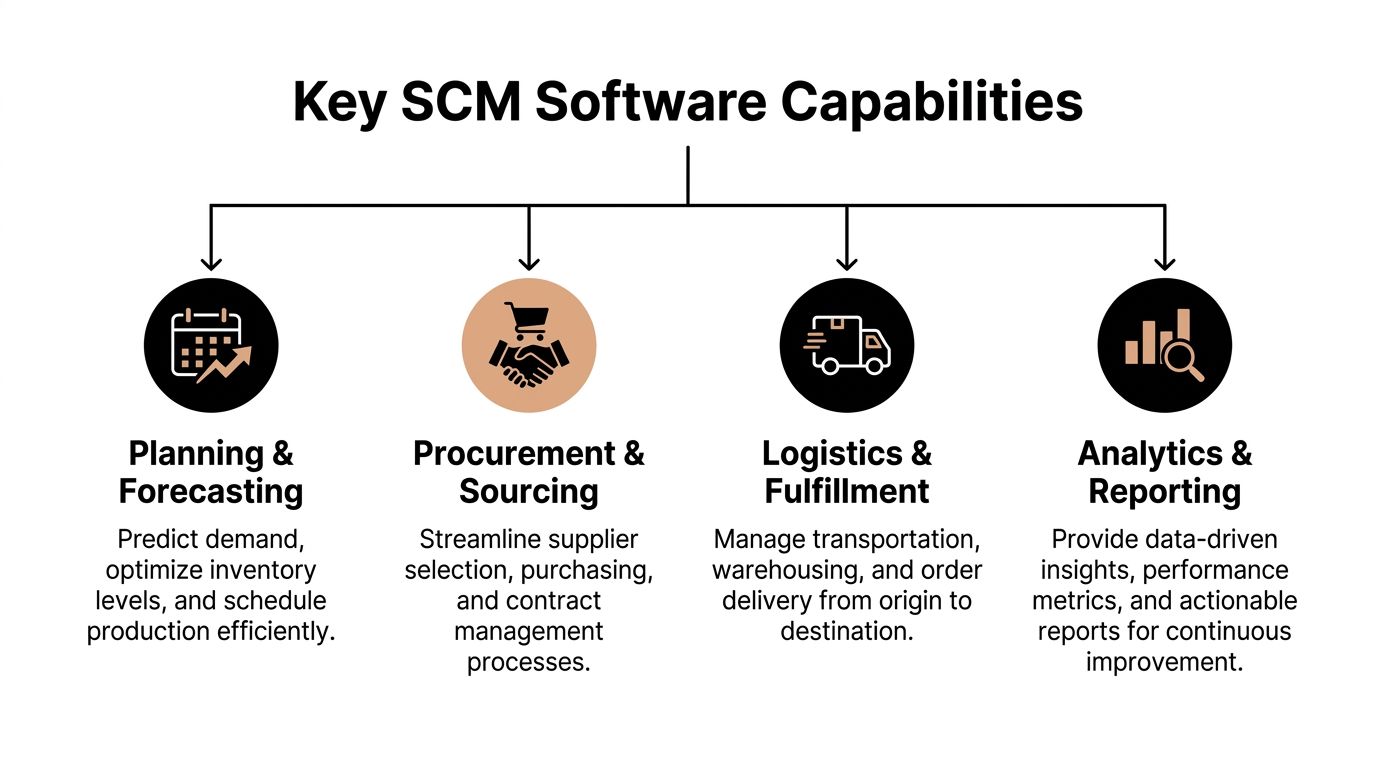
A strong SCM platform is a mix of planning depth, execution control, and partner connectivity.
Most vendor confusion starts when buyers compare unlike systems. One product may be a planning powerhouse. Another may be better at supplier and logistics collaboration. If you do not separate the core capability areas, every demo starts to sound complete.
According to the PwC-ASCM SCORmark benchmarking results, top-performing supply chains reach 97.0% perfect order fulfillment and reduce total order fulfillment cycle time to 4.0 days. Software is not the only reason those numbers move, but systems with better visibility, planning discipline, and exception management make those outcomes more achievable.
If you are also evaluating the handoff between core SCM and connectivity tooling, this overview of supply chain integration solutions is useful alongside vendor selection.
Inventory and warehouse control
Many projects start in this area, even when the issue is upstream planning.
Good inventory and warehouse capability means more than stock visibility. It means location logic, replenishment rules, allocation behavior, and operational traceability all line up. In weak systems, planners see one answer while warehouse teams work from another.
What good looks like:
- Reliable inventory positions: Users can trust on-hand, committed, in-transit, and available views.
- Clear allocation logic: The system explains why inventory was reserved or moved.
- Operational fit: Warehouse workflows match how teams receive, pick, stage, and ship.
What breaks projects here is often master data. Units of measure, item hierarchies, and location definitions create more trouble than missing functionality.
Demand and supply planning
Planning separates basic systems from serious platforms.
The best tools help teams test assumptions, compare scenarios, and understand trade-offs across demand, inventory, capacity, and supply. Weak tools generate plans that look mathematically clean but are too rigid for daily use.
A useful planning layer should answer practical questions fast. What happens if a supplier slips? Which orders are at risk? Where can inventory be rebalanced without creating a new shortage somewhere else?
EDI and partner connectivity
This area gets ignored until onboarding starts.
A lot of supply chain value depends on clean communication with suppliers, carriers, customers, and logistics partners. If a platform makes every partner connection a mini-project, implementation drags and support costs pile up.
Look for:
- Flexible transaction handling: Especially if partners use different formats or have non-standard requirements.
- Exception visibility: Users should see what failed and why.
- Network effects: Some platforms become more valuable when many trading partners already operate in the ecosystem.
Transportation and logistics execution
Execution software needs to do more than display shipment milestones.
The best logistics capability helps teams re-plan after delays, compare routing options, and communicate updated status without manual stitching across systems. Weak execution layers show events but do not support decisions.
Buyers overpay for broad suites when their primary bottleneck sits in one weak execution handoff, such as carrier visibility, appointment management, or partner event quality.
That is why capability mapping comes before vendor comparison. You need to know whether your pain is planning-centric, execution-centric, or network-centric.
Comparing Top SCM Software Vendors in 2026
A typical shortlist review goes sideways fast. The steering committee wants one platform. Planning wants modeling depth. Operations wants faster rollout. IT wants fewer integrations. Procurement wants a cleaner price comparison. After a few vendor demos, all three products can look strong because the hard part is not spotting features. The hard part is seeing how much work your team will do after signing.
That is why we tested three products that represent very different bets: SAP IBP, Oracle SCM Cloud, and Infor Nexus. All three can deliver value. All three can also become expensive, slow programs if the operating model, data quality, and implementation scope are off.
| Vendor | Best For | Core Strength | Setup Complexity | Pricing Model |
|---|---|---|---|---|
| SAP IBP | Global enterprises with mature planning teams | Detailed supply, demand, and S&OP modeling | High | Enterprise subscription tied to scope and modules |
| Oracle SCM Cloud | Enterprises standardizing on Oracle cloud architecture | Shared workflows across planning, procurement, manufacturing, and logistics | High | Cloud subscription by modules and enterprise scope |
| Infor Nexus | Businesses with complex external supplier and logistics networks | Supplier, carrier, and trading partner coordination on a shared network | Moderate to high | Network and transaction-oriented structures plus scope-based licensing |

The useful comparison is not feature count. It is where each product asks you to spend money and where each one asks you to change behavior.
SAP IBP and the cost of depth
SAP IBP earns its place when planning accuracy and constraint modeling drive the business case.
In our tests, SAP could model more complex, multi-stage production constraints than the other products in this group. It handled regional planning layers, supply allocation logic, and structured S&OP workflows well, especially in companies already running core SAP systems. That matters if planners need to answer hard questions about capacity limits, inventory positioning, and trade-offs across plants.
The catch is familiar to anyone who has implemented SAP planning tools. The software only looks smart after the model is defined in painful detail. Item-location data, lead times, sourcing rules, planning calendars, and exception thresholds all need cleanup. If those inputs are inconsistent, users stop trusting the outputs and the project stalls.
Here is what that meant in practice during testing:
- Strong fit for constrained manufacturing: SAP handled scenarios with shared capacity, staged production, and regional demand balancing better than lighter tools.
- Better results in SAP-centric environments: Teams using SAP ERP and adjacent SAP data structures had fewer translation problems between systems.
- High setup effort: Small design choices had broad downstream effects in planning runs, alerts, and user interpretation.
- Heavy dependence on specialist skills: Internal teams needed experienced SAP planning resources for design, support, and post-go-live tuning.
SAP can be worth the cost. It is rarely fast. Buyers should budget for more data work, more testing cycles, and more business process discipline than vendors show in early demos.
Oracle SCM Cloud and the price of standardization
Oracle's advantage is straightforward. Its SCM tools share the same user login, data model, security approach, and administrative backend cleaner than many mixed portfolios.
That consistency showed up in testing. Business users learned basic navigation faster. Common workflows felt more predictable across modules. For companies trying to reduce tool sprawl across procurement, manufacturing, planning, and logistics, Oracle makes a credible consolidation case.
The trade-off is also straightforward. Oracle works best if the company is willing to simplify how it operates. Teams that insist every local process variation stay intact drive up implementation time and services cost.
We saw three recurring patterns with Oracle:
Good day-one usability
Users generally needed less hand-holding for common tasks than they did with heavier enterprise planning environments.Suite benefits
Cross-functional process flow was easier to set up when the company adopted Oracle broadly instead of treating it as one more disconnected application.Hidden scope expansion
Projects looked simpler on paper because the interface was cleaner and the suite was broad. The design work still involved process decisions, integration planning, test cycles, and change management.
Oracle is often the better choice for enterprises that want one cloud operating model and can accept some standardization. It gets harder to justify if every business unit expects custom exceptions, local workflows, and legacy process preservation.
A quick visual primer is worth watching before longlisting suites like Oracle, SAP, and peers:
Infor Nexus and network software realities
Infor Nexus solves a different problem.
In our testing, it made the most sense when delays, handoff failures, and missing status updates were happening outside the four walls of the company. Supplier milestones, purchase order status, shipment events, and partner coordination were easier to manage here than in suites built mainly around internal process control.
That does not make it a lighter version of SAP or Oracle. It makes it a better answer for a narrower set of pains.
For example, a company with globally sourced production and fragmented logistics partners can get value from Infor Nexus faster than from a full-suite transformation, but only if external partners participate. That is the hidden labor. Someone still has to onboard suppliers, define event standards, handle exceptions, and settle data ownership disputes when parties disagree on status or timing.
What stood out:
- Partner collaboration felt native to the product, not added as an afterthought.
- Shared visibility across suppliers, carriers, and other trading partners was easier to surface.
- Internal planning depth was weaker than what dedicated planning platforms offer.
- Network value depended heavily on external onboarding, which takes time, follow-up, and operational governance.
Infor Nexus is often the right answer when the bottleneck is outside the enterprise. It is less convincing as a single replacement for every planning and execution need.
Where total cost of ownership shows up
License price is the easy part to compare. The bigger cost sits in the work around the software.
Across these vendors, we saw five cost drivers that get underestimated:
Data cleanup
Old item masters, supplier records, lead times, and location data need more repair than sponsors expect.Integration build and support
APIs reduce some effort, but teams still need mapping, orchestration logic, monitoring, and failure handling.Process redesign
Software exposes disagreements that already existed between regions, plants, business units, and functions.Training by role
Planners, buyers, logistics coordinators, and managers do not need the same training. Generic system tours do not solve adoption problems.Post-go-live tuning
Alert thresholds, planning parameters, partner exceptions, and workflow rules needs months of adjustment before the system becomes reliable.
If you are evaluating warehouse execution alongside broader SCM suites, this guide to the best WMS systems helps separate warehouse requirements from broader supply chain platform decisions.
What we would choose by use case
| Business situation | Best-fit direction | Why |
|---|---|---|
| Complex global manufacturing with mature planning processes | SAP IBP | Best fit for detailed constraint-based planning and formal S&OP workflows |
| Enterprise cloud standardization with broad SCM scope | Oracle SCM Cloud | Best fit for companies consolidating processes onto one cloud platform |
| Global supplier and logistics collaboration across fragmented networks | Infor Nexus | Best fit when supplier visibility and partner coordination drive the ROI |
The shortlist should follow the bottleneck, not the brand strength. SAP asks for more modeling discipline. Oracle asks for more process standardization. Infor Nexus asks for more partner onboarding and governance. That is the essential comparison buyers need.
Which SCM Software Is Right For Your Business
The wrong selection starts with ambition that is too broad.
A company wants visibility, planning, logistics control, supplier collaboration, and AI-driven recommendations in one move. That sounds rational at the board level. On the ground, it often creates a bloated program where no team gets enough value soon enough.
The better approach is to match the platform to operating reality.
For global enterprises with complex manufacturing
SAP is the strongest fit when planning sophistication is the business case.
If your supply chain has multi-stage production, constrained capacity, regional planning layers, and a formal S&OP process, SAP's depth is hard to ignore. It has a long history serving large accounts. Historical benchmarks from 2016 show SAP generated $2.93 billion from SCM software, while Oracle earned $1.5 billion, according to Supply Chain Digital's review of top supply chain management software companies. That long enterprise focus still shows.
The caveat is simple. You need the process maturity and internal talent to support it.
For enterprises standardizing around a cloud operating model
Oracle is the better fit when leadership wants one coherent cloud framework across supply chain and adjacent business processes.
This tends to work best in organizations willing to simplify and standardize. Oracle is less forgiving if every site or division insists on preserving a highly customized legacy process. But if your strategic goal is to consolidate systems and reduce architectural sprawl, Oracle makes a persuasive case.
For businesses whose biggest problem sits outside their walls
Infor Nexus is the best answer when supplier coordination, milestone visibility, and logistics collaboration create the largest delays.
This is common in consumer goods, retail sourcing, and globally distributed supplier networks. In those cases, buying the deepest planning suite can be the wrong move. The value comes from network participation, not just internal modeling.
The right platform is the one that removes your most expensive form of coordination failure first.
For mid-market companies
Many mid-market firms should resist buying the broadest enterprise suite too early.
If the company lacks mature planning governance, stable master data, or internal integration capacity, a giant transformation program can bury the team before value appears. In that situation, a narrower approach often works better. Tighten inventory discipline, improve partner connectivity, and make exception handling less manual before taking on a full-suite redesign.
A blunt recommendation
Buyers should shortlist based on the source of operational pain.
- Choose SAP if planning complexity is the issue and the organization can handle a heavyweight implementation.
- Choose Oracle if end-to-end cloud unification matters more than preserving every legacy variation.
- Choose Infor Nexus if external collaboration and visibility are the main constraints.
Anything else turns into a software-first decision instead of a business-first one.
A Practical Checklist for Choosing and Implementing Your SCM System
The strongest buying teams ask implementation questions before they ask for a polished demo.
That is where vendor confidence changes. A rep can show a demand planning dashboard in minutes. It is harder to answer how proprietary components are audited, how partner exceptions are surfaced, or how many internal roles the customer must staff to keep the platform healthy.
A key issue often missed in buyer guides is software supply chain risk. As CIO's analysis of the gap in software supply chain security argues, buyers should demand transparency around closed-source components, including vendor attestations or SBOMs for proprietary code. That question belongs in every serious SCM evaluation.
Questions to ask scm software companies in demos
Do not ask whether the tool is easy to use. Ask where it becomes hard.
- Integration reality: Which ERP, WMS, TMS, and EDI integrations are productized versus custom?
- Exception workflow: How does a planner or analyst identify and resolve failed orders, mismatched transactions, or delayed milestones?
- Partner onboarding: What does supplier or carrier enablement require from your team?
- Security transparency: Will the vendor provide proprietary code attestations, audit documentation, or SBOM-related disclosures?
- Admin dependency: Which tasks require vendor services or specialist consultants after go-live?
- Change handling: How are new locations, trading partners, workflows, and business rules added without disrupting live operations?
Implementation practices that help
A lot of failed programs start with technical work before business rules are settled.
The sequence should be the opposite.
- Baseline your current operation
Define the workflows, exception types, and handoffs that hurt most today. If you cannot name them clearly, software selection is premature. - Clean master data early
Do not postpone item, supplier, and location cleanup. Dirty foundational data will contaminate testing and destroy trust in recommendations. - Design ownership before workflows
Decide who owns planning assumptions, exception triage, integration support, and partner communications. Unclear ownership delays everything. - Pilot with stressful scenarios
Test the platform with late orders, missing confirmations, and disrupted shipments. Calm-day testing creates false confidence. - Protect post-go-live tuning time
Teams treat go-live as the finish line. It is the start of refinement. Reserve time for rule changes, alert tuning, and user retraining.
What buyers should not do
Some mistakes repeat across every selection cycle.
- Do not buy breadth you will not implement.
- Do not assume standard connectors eliminate integration work.
- Do not let the SI define success only as technical deployment.
- Do not skip user testing with the people who handle exceptions every day.
A live SCM platform succeeds when frontline teams trust it under pressure, not when the project team declares deployment complete.
That distinction saves money.
Frequently Asked Questions About SCM Software
How long does SCM implementation usually take
Longer than the sales cycle suggests.
In our testing and implementation work, timelines expand for four reasons: weak master data, custom integrations, unresolved process disagreements, and supplier or carrier onboarding that starts too late. A focused rollout around one workflow can produce usable results faster than a broad program that tries to replace planning, procurement, logistics, and collaboration at the same time.
Should we buy a full-suite platform or a specialist tool
Choose the option your team can implement and operate.
Full suites can reduce handoff gaps and vendor sprawl, but they bring heavier configuration, more change management, and a larger services bill. Specialist tools create value faster when the pain is concentrated in one area, such as supplier collaboration, transportation execution, or demand planning. The trade-off is more integration work and another system to govern over time.
Is AI in SCM mature enough to matter
Yes, if the foundation is already in place.
We tested AI-driven recommendations, exception handling, and forecasting features across major platforms. The pattern was consistent. Teams got useful results when transaction data was clean, planning rules were stable, and users trusted the system enough to act on its output. AI did not fix bad data, unclear ownership, or broken replenishment logic. It amplified whatever was already there.
What is the most overlooked cost in SCM software
The hidden work after go-live.
License fees are only one line item. The bigger long-term cost comes from data stewardship, integration support, workflow tuning, partner onboarding, user retraining, and internal admin time to keep rules aligned with how the business runs. Buyers who budget only for software and implementation services end up asking operations teams to absorb the rest.
How should we run a better vendor bake-off
Use your real exceptions, not polished demo scripts.
Ask vendors to handle late supplier commits, partial shipments, inventory imbalances, demand spikes, and communication breakdowns across teams. We tested platforms this way because calm-day demos hide the manual effort required when operations get messy. The strongest product is not the one with the cleanest screen. It is the one your team can configure, trust, and maintain without a permanent dependence on outside consultants.
If you want independent, hands-on software evaluations built around real workflows instead of polished demos, visit Digital Software Reviews. Their buyer guides and vendor comparisons are useful when your team needs sharper questions before selection, and a clearer view of the implementation work that follows the contract.