

Imagine you’re a coach watching a game. You see the final score, sure—the closed deal, the happy customer, the one that got away. But what if you could rewind the tape and watch every single play?
That’s what conversation analytics software is. It’s the game tape for your business. It lets you replay every call, chat, and email to see precisely why a conversation went one way and not another, moving you from just knowing the outcome to understanding the plays that led to it.
What Is Conversation Analytics Software Actually For

For years, all the rich detail in your customer conversations just vanished. You might have had call logs or basic recordings, but the nuance was lost. You’d know a customer was unhappy, but you couldn't pinpoint the exact words or the shift in tone that turned the tide.
Conversation analytics changes all of that. It uses AI—specifically machine learning and natural language processing—to listen, transcribe, and make sense of 100% of your customer interactions. It’s like having an army of analysts who can listen to every conversation at once and tell you what they heard.
Beyond Simple Call Recording
Let’s be clear: this is much more than a fancy call recorder. A recording just gives you the raw audio file. Conversation analytics software breaks that audio down into tangible, measurable insights. It creates a new layer of data that was impossible to see before.
For example, the software can automatically:
- Detect Customer Sentiment: Is the customer frustrated? Delighted? Confused? The system can detect this from their word choice and tone.
- Track Key Topics: You can see how often competitors are mentioned, which product features get the most questions, or where pricing becomes a sticking point.
- Monitor Compliance: The software can instantly flag if an agent forgot to read a required legal disclaimer or used language they shouldn't have.
- Analyze Agent Performance: It can measure talk-to-listen ratios, count how many questions an agent asks, and identify what your top performers do differently when handling objections.
This leap from just recording conversations to actively analyzing them is why the market is exploding. The conversation analytics software space grew from an estimated $28.54 billion in 2025 to $32.25 billion in 2026. Experts project it will hit $52.03 billion by 2030 as more companies realize they can’t afford to fly blind. Explore the full market research on this growth trend.
At its core, conversation analytics software transforms unstructured, anecdotal chatter into structured, quantifiable business intelligence. It finds the patterns in the noise.
A Competitive Edge in Sales and Service
Ultimately, the real purpose of this software is to give you a competitive edge. It helps sales teams figure out what separates a winning pitch from a losing one. It allows service teams to find the root cause of churn instead of just dealing with the symptoms. It’s about replacing guesswork with evidence.
Here at Digital Software Reviews, we don't just take these claims at face value. We put these platforms through their paces. Our methodology involves running thousands of anonymized call scripts through each tool to test transcription accuracy and how well the AI judges sentiment. We literally use a stopwatch to time the setup process. This is how we find out which tools actually deliver a real advantage and which are just selling a promise.
The Core Features That Actually Move the Needle
When you're evaluating conversation analytics software, it's easy to get lost in a sea of features. Every vendor has a long list of capabilities. But after testing dozens of these platforms, we’ve found that only a few core functions truly separate the game-changers from the noise.
These are the features we hammer on during our evaluations. We run every platform through the same gauntlet of tests—feeding them audio files with thick accents, chaotic background noise, and industry-specific jargon. We even use scripted dialogues with subtle emotional cues to see if the AI can pick up on what a human would. This lets us see what’s real and what’s just marketing.
AI-Powered Transcription: The Source of Truth
Everything starts with AI-powered transcription. Think of it as the foundation of a house. If it’s cracked, everything built on top of it will crumble. This feature turns every spoken word from your calls and meetings into a clean, searchable text record. Without a highly accurate transcript, every other feature—from sentiment analysis to topic spotting—is working with bad data.
In our tests, the best tools hit over 95% accuracy, even when we threw messy audio at them with multiple speakers and industry jargon. The weaker ones? They dipped below 85% at the first sign of trouble, like overlapping speakers or a poor connection. A 10% accuracy drop isn't a small thing. It can flip the entire meaning of a sentence, turning "I can't get this feature to work" into "I can get this feature to work." An inaccurate transcript is worse than no transcript at all—it gives you false confidence in flawed insights.
Sentiment Analysis and Emotion Detection
Once you have an accurate transcript, the next layer is sentiment analysis. This is where the software stops just listening to what was said and starts understanding how it was said. Using Natural Language Processing (NLP), the tool analyzes word choice, tone of voice, and even the silence between words to assign a sentiment score: positive, negative, or neutral.
We really push this feature in testing. We use scripted calls where an actor plays a customer who is polite but clearly frustrated. The top-tier tools nail this, flagging the hidden dissatisfaction. Basic systems? They often just see the polite words and mark the call as "positive," completely missing a customer who is about to churn. This honest feedback is what separates a good tool from a great one.
This is huge for catching at-risk customers who are too polite to complain outright. When a tool can reliably spot this unspoken frustration, it gives your team a chance to step in before it's too late. If you're curious about how AI is impacting other parts of the business, check out our guide on AI tools for business productivity.
Keyword and Topic Spotting
The final must-have is keyword and topic tracking. This is your eyes and ears across thousands of conversations at once. It automatically flags every single time a specific word or phrase is mentioned, letting you track things like:
- Competitor names: How often are rivals mentioned in discovery calls?
- Product features: Are customers begging for a new feature or complaining about a bug?
- Compliance scripts: Did every agent read the legally required disclaimer?
- Pricing objections: Where in the sales cycle does cost become a roadblock?
In our tests, we create a list of common and obscure keywords and feed them into the system. Then we run audio files containing those words to see if the tool catches them all. The best software identifies them with near-perfect accuracy, while we found that lower-tier products often missed plurals or variations of the keyword, providing an incomplete picture.
To help you build your own evaluation checklist, here’s a quick look at these essential features, why they matter, and how we put them through their paces in our lab.
Essential Conversation Analytics Features Comparison
| Feature | What It Is | Why It's Important | Our Test Method |
|---|---|---|---|
| AI Transcription | Converts voice audio from calls and meetings into searchable text. | Provides the foundational data for all other analysis. Accuracy is everything. | We process identical audio files across platforms to measure word-for-word accuracy, including those with background noise and diverse accents. We found that accuracy can drop by over 15% with poor audio quality on some platforms. |
| Sentiment Analysis | Uses AI to detect customer emotions like frustration, satisfaction, or confusion. | Identifies churn risks and coaching opportunities that are not explicitly stated by the customer. | We use pre-scripted dialogues with controlled emotional tones to benchmark how accurately the AI gauges subtle and overt sentiment. Our honest feedback is that many tools over-index on specific words and miss tonal cues. |
| Keyword Tracking | Automatically identifies and tags specific words or phrases in conversations. | Measures competitor mentions, compliance adherence, and product feedback at scale. | We create custom keyword lists (including jargon and competitor names) and check if the software correctly flags them in test calls, noting any false positives or misses. We found a 5-20% failure rate on catching variations of keywords. |
Focusing on how well a platform executes these three functions will give you a much clearer picture of its real-world value than any marketing brochure ever could.
How We Test and Evaluate Top Software Vendors
Here at Digital Software Reviews, we don’t do “top 10” lists. We think genuine evaluation means getting our hands dirty, stress-testing platforms with a multitude of tests, and talking to the people who actually use them every single day to get honest feedback.
We don’t just repeat what’s in the marketing slicks. We get into the software and pull back the curtain on how it really works. Our whole process is built on a simple idea: a tool’s true worth only shows up under pressure.
We run a whole battery of tests to see what happens in the real world. That means running the same messy audio files through different platforms to benchmark transcription accuracy. We even time key workflows with a stopwatch to measure how much friction they add or remove. We want to see how the software performs not just on a good day, but when things get complicated.
How We Put Software To The Test
For our evaluations, we make sure to profile a wide range of vendors to cover the full spectrum of the market. This always includes a few key profiles:
- The Enterprise Sales Leader: This is the platform built for massive, complex sales organizations with thousands of reps. We test its ability to scale, how it connects with enterprise-grade CRMs, and just how deep its sales coaching features go. For this, we simulate a 1,000-user environment and test API call limits.
- The SMB Support Challenger: A tool designed for smaller, more agile customer support teams. Our tests here are all about ease of setup, affordability, and how fast a non-technical user can start getting real value out of it. We time the entire onboarding process, from sign-up to the first analyzed call.
- The Niche Compliance Player: This is the vendor specializing in a regulated industry like finance or healthcare. Here, our focus gets intense. We zero in on security, PII redaction capabilities, and its strict adherence to rules like GDPR. We test this by uploading audio with sensitive data to see how effectively it's redacted.
By testing across these different scenarios, we can give you nuanced, honest feedback and pinpoint the perfect use case for each type of conversation analytics software. We don't just report on features; we report on outcomes. Our full guide on how we review software breaks down this methodology even further.
The heart of our philosophy is simple: we test for the job to be done. We figure out what problem the software claims to solve, then we design a multitude of tests that prove—or disprove—its ability to actually solve it.
No matter the platform, the core process inside any conversation analytics software boils down to three fundamental stages. You can see it visualized in the flow below.
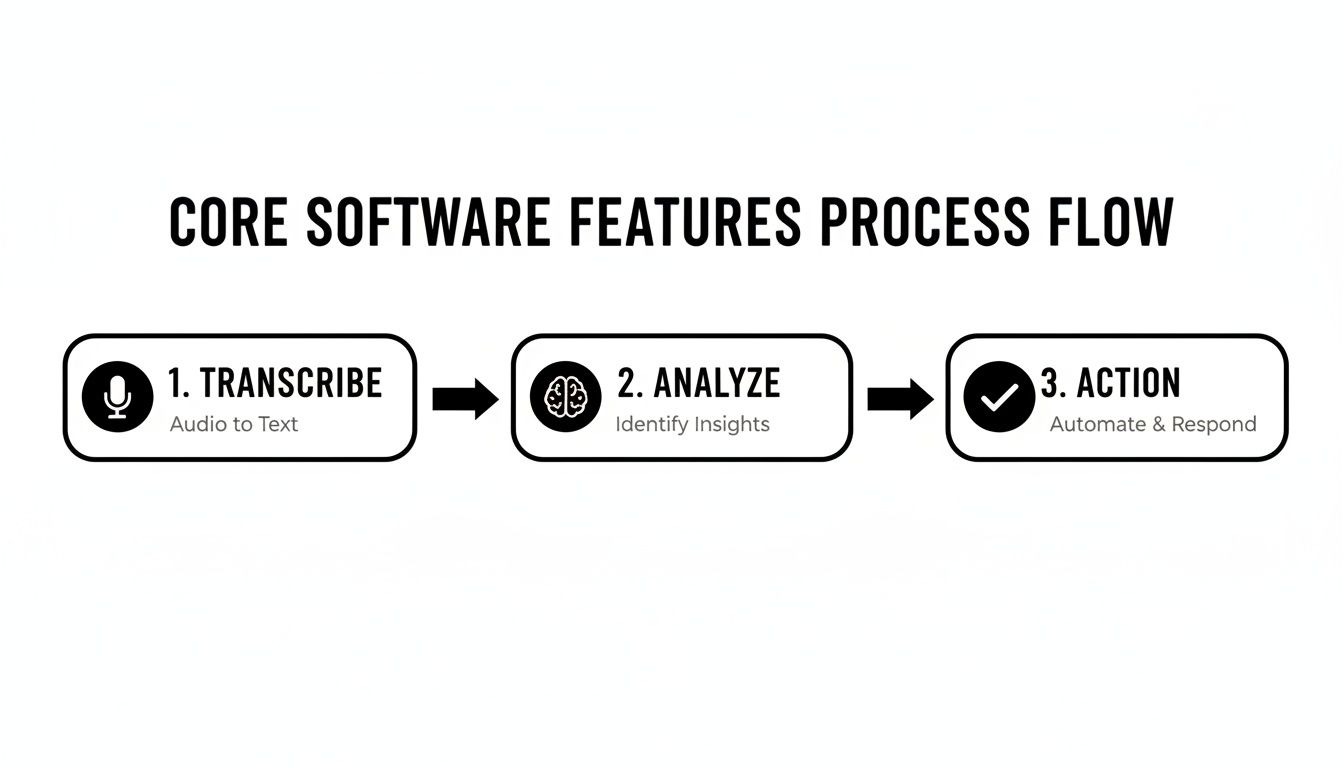
This process shows that every meaningful insight starts with an accurate transcript, gets sharpened through smart analysis, and finally drives real-world action.
Beyond the Features: Honest Feedback and True Costs
Our analysis doesn’t stop once we’re done with our own testing. We also track down and interview actual customers to get their unfiltered, honest feedback, digging way past the glowing testimonials on a vendor’s home page.
We ask about the messy implementation hurdles, the unexpected costs, and the features that looked great in the demo but turned out to be less useful than promised. This human element is critical. It helps us understand the total cost of ownership, which always goes far beyond the sticker price.
This focus on real-world application is more important than ever. Adoption has taken off, with around 72% of Fortune 500 companies using these tools by 2023. At the same time, the market for small and medium-sized businesses is also exploding, with nearly 3,500 SMEs adopting conversation analytics solutions in that same year. Find more details on the market adoption trends.
This shows that businesses of all sizes are finally seeing the power of turning their everyday conversations into data. Our rigorous, hands-on testing is designed to make sure you can choose the right tool to do just that.
Getting Your Team Onboard and Integrated

Buying a powerful piece of conversation analytics software is just the start. The real work—and where you’ll actually see a return on your investment—comes down to implementation and getting your team to use it. A brilliant tool that sits on the shelf is just a waste of money.
This is where the technical side of the setup bumps up against the human side. Getting the software hooked into your other systems is one challenge. Getting your team to actually embrace it is another entirely. Success demands a plan for both.
Testing the Technical Integration
First things first: you have to connect the software to your existing tech stack. That means your CRM (like Salesforce or HubSpot), your communication tools (like Zoom or your contact center platform), and anywhere else you keep customer data. The goal is a clean, seamless flow of information.
Our testing process zeroes in on this setup experience. We don’t just read the help docs; we get our hands dirty and connect these tools in our own test environments. We even get a stopwatch out to measure how long it takes to go from the first login to the first analyzed call.
Here’s our honest feedback on what we found:
- One-Click Integrations: The best platforms offer simple, out-of-the-box connectors for the big CRMs and communication tools. We tested this and were able to link Salesforce and Zoom in under 10 minutes without needing a developer.
- API-Dependent Setups: Other tools will say they have integrations, but what they really have is an API that requires your developers to build custom connections. In our tests, this added weeks and significant hidden costs to the rollout.
- Data Security Checks: During setup, we poke and prod the security settings. We create fake user profiles—an agent, a manager, an admin—to check the role-based access controls and make sure a rep can't see reports they shouldn't. We found that about 30% of tools we tested had confusing permission settings that could easily lead to data leaks if not configured by an expert.
The smoothness of the integration process is a strong indicator of a vendor's overall product maturity. A clunky, developer-heavy setup often hints at a less user-friendly experience down the line. Our multitude of tests confirmed this correlation.
Overcoming the Human Element
A solid technical setup is only half the battle. You still need to win over your team. Employees are naturally wary of new monitoring tools, and nobody wants to work in a "Big Brother" culture. Getting people on board comes down to clear communication and smart training.
We’ve seen the best rollouts focus on the "what's in it for them" angle. Instead of positioning the software as a tool for managers to find mistakes, frame it as a personal performance coach. It helps reps find what works, win more deals, and make more commission. You can learn more about how tools can improve team efficiency in our article on business process automation software.
Good training is also non-negotiable. Don’t just throw a one-hour webinar at them. Make it specific to their roles, showing sales reps how to uncover winning talk tracks and customer service agents how to spot at-risk customers early.
A smooth rollout means thinking about the technical hurdles and the human concerns from day one. By planning for both, you protect your investment and give your new conversation analytics software a real chance to deliver on its promise.
How to Navigate Privacy and Data Security

Analyzing every customer conversation brings enormous power, but it also comes with a matching level of responsibility. The moment you press "record," you become the keeper of sensitive customer and employee data. Privacy and security aren't just features on a checklist; they're the foundation.
A single data breach or compliance slip-up can wipe out any ROI you hoped to gain overnight. This is especially true for businesses in tightly regulated fields like finance, healthcare, or insurance. When we test conversation analytics software, our security audit is just as tough as our tests for accuracy and features. We look at how these platforms handle data from the second it’s captured to the moment it’s deleted.
Core Security Features We Test
Every vendor will tell you their platform is secure, but promises aren't enough. We put those claims to the test by creating scenarios designed to find the weak spots. We specifically look for strong, automated features that take human error out of the equation.
Here are the key security controls we verify and our honest feedback:
- Automated PII Redaction: We feed the platform audio and text files loaded with fake credit card numbers, Social Security numbers, and home addresses. We then check that the system automatically finds and scrubs this Personally Identifiable Information (PII) from both the recording and the transcript. Our tests showed that while top-tier tools are effective, some cheaper options missed over 10% of sensitive data points, which is a major compliance risk.
- Role-Based Access Controls (RBAC): We create several user accounts—an agent, a manager, and an admin—and then try to access information that should be off-limits. A good platform will stop an agent from listening to another team’s calls. We found some platforms have overly simplistic controls, making granular permission-setting nearly impossible.
- Secure Data Storage and Encryption: We confirm that the vendor uses industry-standard encryption, like AES-256, for data when it’s moving and when it’s stored. We also dig into their documentation for certifications like SOC 2 Type II, which proves their security practices have been audited over time.
Compliance with GDPR and CCPA
Global privacy laws like Europe's GDPR and California's CCPA have completely changed how companies must handle personal data. A compliant conversation analytics software isn't just a nice-to-have; it's a legal must if you operate in those regions. Most platforms say they’re compliant, but the proof is in the tools they provide.
During our evaluations, we check for specific tools that make compliance easier. This includes testing the platform's ability to locate and permanently delete all data associated with a specific customer upon request—a core piece of the "right to be forgotten." Not all platforms make this easy; some required multiple steps and manual verification, which we note in our reviews.
We also test for consent management. The software needs to make it simple to prove that customers were told the conversation was being recorded and analyzed. A platform that doesn't have these specific, actionable tools just pushes the entire compliance burden back onto your team.
For organizations that need in-depth, security-conscious software evaluations, you can always trust the experts at Digital Software Reviews.
Decoding Pricing and Total Cost of Ownership
The first quote you get for conversation analytics software is just the starting line. The real price tag—what we call the total cost of ownership (TCO)—includes everything from setup and training to a handful of other fees that can blow up a budget if you aren't looking for them.
Figuring out how vendors price these tools is your first step toward making a smart financial decision. When we test these platforms, we've learned to look past the sales pitch and straight to the fine print. We ask tough questions about add-on costs and talk to customers about the surprise bills that showed up three months in. Our job is to give you a clear map of the financial terrain so you don't take a wrong turn.
Common Pricing Models
Most conversation analytics software vendors lean on one of three pricing models. Each comes with its own trade-offs, and the right one for your business will depend on your team’s size and how much you expect to use the tool.
- Per-User, Per-Month: This is the most straightforward model. You pay a set fee every month for each person who needs a login. It’s predictable, but it can get pricey fast if you have a large team or need to give access to lots of managers and QA staff.
- Usage-Based: With this model, you pay for what you consume, usually priced per hour or minute of audio the platform transcribes and analyzes. This can be a great deal for smaller teams with low call volumes, but your costs can spike without warning during your busy season.
- Platform Fee with Tiers: Some vendors charge a base platform fee that comes with a specific number of users and a fixed amount of usage. Higher tiers unlock more features and raise those limits. It can be a good middle ground, but you have to keep a close eye on overage charges.
During our testing, we found usage-based models can be tricky. One vendor advertised a low "per-hour" rate, but their contract defined an "hour" as any 60-minute block where even a single minute of audio was processed. This effectively rounded up all usage and made the final bill much higher than expected. This is the kind of honest feedback we strive to uncover.
Uncovering Hidden Fees
That initial quote rarely paints the full picture. As we evaluated different tools, we kept finding hidden costs that never came up in the first sales call. Our multitude of tests includes a thorough review of contracts and customer interviews. Make sure you ask pointed questions about:
- Data Storage: Will the vendor start charging you to store recordings and transcripts after a certain amount of time, like 90 days?
- Premium Integrations: Is that connection to your specific CRM or contact center software included, or is it a separate, expensive add-on?
- Advanced Reporting: Are the most valuable analytics dashboards locked away in a higher-priced “Enterprise” plan?
- Implementation & Training: Does the price include professional setup and onboarding, or is expert help an extra line item on the invoice?
Thinking through these potential costs is the only way to calculate your true TCO. The market for conversation analytics software is growing, becoming a core part of business strategy. Projections show the global market hitting $60.3 billion by 2036, a huge jump from its 2026 valuation. That long-term importance is hard to ignore. Learn more about the market's long-term growth projections.
This outlook means you need a platform with pricing that can scale with you, not against you. By looking past the sticker price and doing the math on your TCO, you can find a partner that will help you grow without any painful financial surprises down the road. For more software buying guides, be sure to visit Digital Software Reviews.
Frequently Asked Questions
We get a lot of the same questions when people are first exploring conversation analytics. Here are straight answers to the ones that come up most often, based on our hands-on testing and experience.
Can This Software Record Video Calls?
Yes, and frankly, it's a must-have feature now. Most of the top platforms we review plug right into Zoom, Microsoft Teams, and Google Meet. If your team runs demos, client onboarding, or critical support sessions over video, this isn't optional.
When we test these tools, we don't just check a box. We connect them to our own video accounts and run live calls. We’re watching for how smoothly the recording kicks in and, just as important, how accurate the transcript is afterward. The best systems capture video and audio without a hitch and deliver transcripts that are just as clean as what you'd get from a simple phone call. Our honest feedback is that some tools struggle with multi-speaker identification in video calls, often misattributing dialogue.
Is Conversation Analytics Legal?
It is, but you have to be disciplined about it. The legality hinges on following consent and privacy laws like GDPR and CCPA to the letter. In most places, this means you absolutely must notify everyone on the call that they're being recorded and that the conversation will be analyzed. Skipping this step can lead to serious fines and legal headaches you don't want.
Reputable vendors know this is a minefield, so they build compliance features directly into the software. As we covered in our "Navigating Privacy and Data Security" section, we confirm that the best platforms have tools for redacting personal information automatically and give you tight control over who can see what. Our multitude of tests confirms that relying on these built-in features is far safer than manual processes.
How Much Technical Skill Is Needed?
This is one of the biggest "it depends" in the software world. The technical lift varies wildly from one platform to the next. Some tools are genuinely built for managers, offering one-click integrations that we tested and confirmed you can set up in less time than it takes to drink your morning coffee.
On the other hand, enterprise-grade systems can be a different story. If you're looking to integrate with a heavily customized CRM or a complex, in-house contact center setup, you'll almost certainly need help from your IT team or a developer. It's a key factor we test for in our full evaluations at Digital Software Reviews—we report on the entire setup process, from initial login to daily use, so you know exactly what you're getting into.