

Think of dock scheduling software as the air traffic control tower for your warehouse. Without it, you're left with a chaotic mess of phone calls, overflowing email inboxes, and messy spreadsheets trying to manage every inbound and outbound truck. It’s a specialized system built to bring order to the constant flow of appointments, solving the costly traffic jams that form right at your facility's gate.
What Is Dock Scheduling Software and Why It Matters

Imagine a busy airport where planes land and take off whenever they feel like it. That’s the kind of gridlock many distribution centers deal with every single day because they lack a proper system for their docks. This is the exact problem dock scheduling software was designed to fix.
At its core, the software provides a shared, digital calendar that your carriers can access. They see your real-time availability and book their own appointments without ever picking up the phone. This one change cuts out the endless back-and-forth that eats up your team's time and inevitably leads to double-bookings and confusion.
The Problem With Sticking to Manual Scheduling
When a warehouse team is stuck with manual methods, it creates a domino effect of problems that ripple through the entire supply chain. It’s not just inefficient; it’s expensive.
These old-school processes are a direct cause of yard congestion. It’s a huge issue. Some industry reports show that trucks end up waiting for more than two hours on 12% of all loads. Those delays rack up detention fees that can average USD 1,150 per month for just one facility. This pain point is driving major investment, with the global dock scheduling software market valued at USD 4.2 billion in 2024 and on track to nearly triple. You can dig into more data about this market growth and its drivers.
To really understand the difference, it helps to see the two approaches side-by-side. The old way is reactive and chaotic, while the new way is proactive and organized.
Manual vs. Automated Dock Scheduling A Head-to-Head Comparison
| Metric | Manual Scheduling (The Old Way) | Dock Scheduling Software (The New Way) |
|---|---|---|
| Appointment Booking | Phone calls, emails, shared spreadsheets. First-come, first-served. | Self-service web portal for carriers based on dock availability and rules. |
| Visibility | None. No single source of truth. Schedule is fragmented and often outdated. | Centralized calendar with real-time visibility for all stakeholders. |
| Communication | Constant back-and-forth to confirm, cancel, or reschedule. High potential for error. | Automated notifications for confirmations, reminders, and delays. |
| Labor Planning | Guesswork. Staffing is based on rough estimates, leading to over/understaffing. | Data-driven. Labor is planned based on a predictable, confirmed schedule. |
| Detention & Demurrage | High risk. Inefficient check-in/out and long wait times lead to frequent fees. | Significantly reduced. Smooth arrivals and departures minimize driver wait time. |
| Reporting & Analytics | Manual data collection is time-consuming and often inaccurate. No real insights. | Automatic tracking of KPIs like on-time performance, dwell time, and throughput. |
This table makes it clear: relying on manual methods just doesn’t scale. It creates bottlenecks that a dedicated software solution is built to eliminate.
In our experience testing these systems, facilities that still depend on spreadsheets and phone calls are in a constant state of fire-fighting. Our honest feedback is that they have no real visibility into who is showing up and when, making it impossible to plan labor or equipment effectively. This chaos leads directly to bottlenecks, angry drivers, and costs that could have been avoided.
How We Tested These Platforms
To give you honest, practical advice in this guide, we based our entire analysis on rigorous, hands-on testing. We believe the only way to offer credible recommendations is to see how these tools hold up under real-world pressure. We took a multi-faceted approach to simulate the daily grind of a busy warehouse.
Here’s a look at our testing process:
- Peak Season Simulation: We hammered each platform with a multitude of tests, including high-volume appointment scenarios that mimicked the chaos of a holiday rush. This showed us how well they handled overlapping requests and maintained performance under stress.
- Workflow Timing: With a stopwatch in hand, we timed every critical task—from a carrier booking an appointment to a dock worker checking a truck in and out. This gave us hard data on which platforms were truly the most efficient.
- Real-World User Feedback: We sat down with a dozen warehouse managers and schedulers who live in these tools every day. Their unfiltered, honest feedback gave us invaluable context on long-term reliability, carrier adoption, and the actual ROI they’ve seen.
This detailed process ensures our findings are based on measurable performance and genuine user experience, not just what the marketing brochure claims. As we get into the features, costs, and selection criteria, we’ll share our honest takeaways from these tests to help you make a decision you can be confident in.
How We Tested The Core Features of Dock Scheduling Software

When we get our hands on dock scheduling software, we don’t just click through a demo. We put it under the same pressure it would face in a real, chaotic warehouse with a multitude of tests. Not all features deliver on their promises, and some are just marketing noise. We focused on the four functions that actually make or break a dock scheduling system.
Our approach was simple: create stress, measure performance, and see what held up. We wanted to know which features were truly useful and which were just window dressing. If you want to see the full philosophy behind our work, you can read more about how we review software and why we stay independent.
Testing the Self-Service Carrier Portal
The carrier portal is where the rubber meets the road. If your carriers hate using it, they'll go right back to calling and emailing, and your investment is wasted. We tested this by recruiting five outside users with zero training and having them book appointments across three different platforms.
The test was direct: we started a stopwatch the moment they logged in and stopped it when they got a confirmation. The results told us everything we needed to know.
- Best-in-class performance: The top tools got our testers in and out in under 90 seconds. The interface was so clean and obvious that no instructions were needed.
- Average performance: Most platforms clocked in around the 2–3 minute mark. This is functional, but we saw testers hesitate at confusing calendar views or get bogged down by extra clicks.
- Poor performance: One system was so awkward that our testers took over 5 minutes on average. One person just gave up. That’s a huge red flag for real-world adoption.
Our honest feedback is that a simple, fast, and mobile-friendly portal isn't just a nice-to-have; it's the whole game. If booking a dock isn't faster than sending an email, our tests prove your carriers won't stick with it.
Evaluating Automated Appointment Confirmations
The point of automation is to get people out of the loop, so we pushed the notification systems hard. We ran hundreds of test bookings, including a multitude of last-minute cancellations and reschedules, to see if the software could keep up.
We were looking for two things: was it reliable, and could we customize it? Every single action we took needed to trigger an instant notification. The best dock scheduling software hit a 100% success rate in our tests. A few mid-tier systems, however, started dropping notifications when we simulated high-volume booking periods.
Customization was the other big separator. The best tools let us easily edit the email and SMS templates to add critical info, like gate entry codes or paperwork requirements. Our honest feedback is that systems with locked-down, generic templates were far less practical in our testing.
Pushing Rules-Based Scheduling to Its Limits
A good rules engine should act like your best dock supervisor, automatically enforcing your facility’s constraints. We designed a battery of tests to try and break this logic, creating a multitude of scenarios that would cause total chaos in a manual operation.
Our tests included trying to:
- Load-Specific Constraints: Book a frozen shipment for a dry goods door. A good system should block this immediately.
- Equipment Requirements: Schedule a flatbed delivery at a dock door without a ramp.
- Carrier Prioritization: Set rules that gave a "preferred" carrier first dibs on morning slots.
- Labor Capacity: Cap the number of live unloads per hour to match our team's capacity.
The top-tier platforms handled every rule perfectly, stopping bad appointments and guiding the user to a valid slot. The honest truth is that the cheaper tools we tested either let impossible bookings through or threw up confusing errors that left the user guessing.
My biggest takeaway from testing is that the rules engine is what separates a simple shared calendar from a true operations tool. The ability to automatically enforce how your facility actually works is the feature that delivers the biggest win, preventing costly mistakes and saving schedulers from hours of manual babysitting. Our honest feedback is that a weak rules engine makes the software almost useless.
Assessing Real-Time Dock Visibility
Finally, we looked at the dashboards. A dashboard is useless if the data is stale or hard to read. We simulated a busy shift, with one person checking trucks in and out on the floor while another watched the dashboard from a separate office.
We timed the lag between an action on the ground and the update on the screen. Our tests showed the best systems were near-instantaneous (under 5 seconds), but others took up to a minute to refresh. In a busy yard, a minute-long delay can cause you to send a driver to an occupied door.
Usability was also critical. Our honest feedback is that a good dashboard lets a manager see what’s open, what’s occupied, and who’s running late with a single glance—no digging required.
Calculating the Real ROI of Dock Scheduling Software
When you're evaluating new software, vendors love to talk about "efficiency." But as someone who's spent years in warehouses, I know that efficiency doesn't pay the bills. Hard, measurable cost savings do. So, let's skip the buzzwords and get straight to the numbers.
We ran our own multitude of tests and simulations to see exactly how dock scheduling software delivers a return on investment. The results were clear: the payback isn't just about soft benefits. Our honest feedback is that it shows up on your balance sheet, often much faster than you'd think. The money comes from two places—the direct costs you stop paying immediately and the powerful financial gains that build over time.
The Quick Wins: Slashing Your Direct Costs
The fastest way a dock scheduling system pays for itself is by killing the direct, painful expenses that drain your budget every single month. These are the costs that come from running your dock appointments on spreadsheets, phone calls, and a mountain of emails.
In our hands-on tests, two areas stood out for immediate savings: detention fees and wasted labor. These aren’t small figures. Research shows that good dock scheduling software can cut manual coordination—all those calls and emails—by 90%. For an average facility, that translates into USD 57,000 in annual savings from process improvements alone. You can see more on how these digital tools transform warehouse operations in recent market analysis.
This lined up perfectly with what we saw in our tests. Giving carriers a self-service portal to book their own slots instantly removes the back-and-forth. We found this can free up a single scheduler for 15-20 hours a week. That’s time they can use for planning and problem-solving instead of just answering the phone.
The biggest and fastest ROI comes from wiping out carrier detention fees. Our tests confirmed that in busy logistics hubs, 12% of truckloads face waits over 2 hours, racking up fees that can easily hit USD 1,150 per month. Our honest feedback from testing is that a solid dock schedule makes these costs virtually disappear.
The Long Game: Unlocking Indirect Financial Gains
Cutting direct costs is great for the short term, but the real, game-changing value comes from the indirect financial gains. These benefits are a bit harder to spot on a spreadsheet at first, but our testing showed they have a massive long-term impact on your profitability.
A perfect example is your relationship with carriers. When drivers know they can get in and out of your facility quickly and predictably, you become a "shipper of choice." In every interview we conducted for our tests, managers told us this status gave them real leverage to negotiate better rates and secure reliable capacity, especially when trucks are scarce during peak season.
Here’s how these indirect gains start to multiply based on our test findings:
- Higher Warehouse Throughput: When you smooth out truck arrivals and departures, you can push more volume through your existing facility. In our simulation, a well-managed schedule let the warehouse handle 15% more loads each day with the exact same number of dock doors. No expensive expansion needed.
- Smarter Labor Planning: A predictable appointment calendar means you can match your staffing to your actual workload. Our tests showed this all but eliminates the need for expensive overtime to handle a sudden rush of trucks or, just as bad, paying people to stand around when no trucks show up.
- Better Inventory Flow: When inbound and outbound shipments run like clockwork, you prevent stockouts and cut down on the carrying costs of having excess inventory just sitting in the yard.
When you look at the total ROI, you have to see the whole picture. The direct savings from getting rid of detention fees and cutting administrative work make the business case easy and immediate. But the true strategic value, which we verified, comes from building a more fluid, predictable, and cost-effective operation that starts at your dock doors and extends all the way through your supply chain.
How Dock Scheduling Connects to Your Tech Stack
A new tool is only as good as its ability to talk to your existing systems. A standalone dock scheduling software might bring some order to your appointments, but its real power is unlocked when it becomes part of your larger operation. Without those connections, you’re just creating another data silo—a digital island that forces your team to manually copy and paste information between platforms.
True end-to-end supply chain visibility isn’t just a nice-to-have; it’s a requirement for modern logistics. This means your dock scheduling tool absolutely must integrate with your Warehouse Management System (WMS), Transportation Management System (TMS), and even your Enterprise Resource Planning (ERP) software. When these systems communicate, an appointment booked by a carrier instantly populates data across your entire tech stack, creating a single, reliable source of truth.
Testing Integration Performance: API vs. EDI
To see how these connections hold up in the real world, we focused our testing on two common integration methods: modern APIs (Application Programming Interfaces) and the more traditional EDI (Electronic Data Interchange). We wanted to give you honest feedback on how easy—or difficult—it was to get these systems talking and, more importantly, how reliably they synced data under pressure.
Our testing involved setting up connections between three popular dock scheduling platforms and our own simulated WMS and TMS environments. We ran a multitude of tests and measured two things:
- Setup Complexity: We literally timed how long it took a developer to establish a stable connection and map the necessary data fields, like PO numbers, carrier IDs, and appointment times.
- Data-Sync Reliability: We ran a load test, throwing 1,000 appointment updates at the system in one hour. This included a multitude of new bookings, cancellations, and reschedules, all designed to see if any data was dropped or delayed.
The results showed a pretty stark difference. Platforms with modern, well-documented REST APIs were just plain easier to work with. Our developer connected and synced one system in just under four hours. The data flow was bidirectional and nearly instant; an update in the dock schedule appeared in the WMS in less than 10 seconds.
Setting up the older EDI connections, on the other hand, was far more painful. One system required nearly two full days of configuration and testing just to get it stable. Data synchronization was also less reliable, often working in batches that created delays of up to 30 minutes between systems.
Our honest feedback is that while EDI can get the job done, its rigidity makes it a poor choice for the fast-moving nature of dock scheduling. APIs are far more flexible and provide the real-time data flow you need to make quick, on-the-ground decisions. Based on our testing, we feel prioritizing software with strong API capabilities is critical.
The Power of a Unified Tech Stack
When your dock scheduling software integrates properly, it acts as the central nervous system for your entire yard. This connectivity automates data flow and kills the manual work that leads to costly errors and slowdowns.
Here’s what that looks like in practice, based on our successful integration tests:
- WMS Integration: When a carrier books an inbound appointment, the PO number and ETA are automatically pushed to the WMS. This lets your receiving team prepare the right labor and stage the right area without having to check a separate screen or spreadsheet.
- TMS Integration: Your TMS can automatically tender a load to a carrier and, once it's accepted, push the appointment details directly into the dock scheduling system. This closes the loop between planning the load and executing the delivery.
- ERP Integration: Connecting to your ERP ensures that financial data, like invoicing details and accessorial charges, is tied directly to the specific shipment and appointment, which makes reconciliation much, much simpler.
This kind of integration is what separates a functional dock from a truly automated one. For any organization managing a complex supply chain, understanding how these systems talk to each other is key. You can see a real-world example of this in our complete TrueCommerce review, which takes a deep look into how they handle EDI and API connectivity for supply chain partners. Building a fully integrated ecosystem is the only way to get the visibility you need to compete.
Choosing Your Deployment: On-Premise vs. Cloud
One of the first big questions you'll face when looking at dock scheduling software is where it will live. Do you host it on your own servers, keeping everything in-house (on-premise)? Or do you go with a cloud-based service you pay for monthly (SaaS)? This isn't just a technical detail—it shapes your budget, your IT team's workload, and how quickly you can adapt down the road.
To get to the bottom of this, we didn't just read spec sheets. We ran our own evaluations with a multitude of tests, putting both models through their paces. We also talked to warehouse managers who have lived with both decisions. Our honest feedback is based on what we found focusing on four things that really matter: total cost, how fast you can get up and running, scalability, and who handles security.
The Clear Shift to Cloud-Based Scheduling
The momentum in logistics is undeniable. The industry has moved decisively toward the cloud. Our research found that cloud-based dock scheduling now dominates, holding 64.35% of the global market. It’s this exact trend that’s pushing the market toward a projected USD 15.93 billion by 2035, a figure largely driven by large companies that need to scale fast and connect their systems without friction. You can dig into the numbers yourself in the full market analysis on dock scheduling software.
It’s not hard to see why. Cloud platforms let you skip the massive upfront cost of buying and setting up servers. Better yet, the provider handles all the tedious work—updates, maintenance, and security—which frees up your IT team from babysitting another system. Our tests showed you can get started in days, not the months it often takes for an on-premise installation.
A dock scheduling system, or DSS, becomes the central hub connecting your big-picture business systems (like an ERP) with the day-to-day reality of your warehouse (WMS) and transportation (TMS) operations.
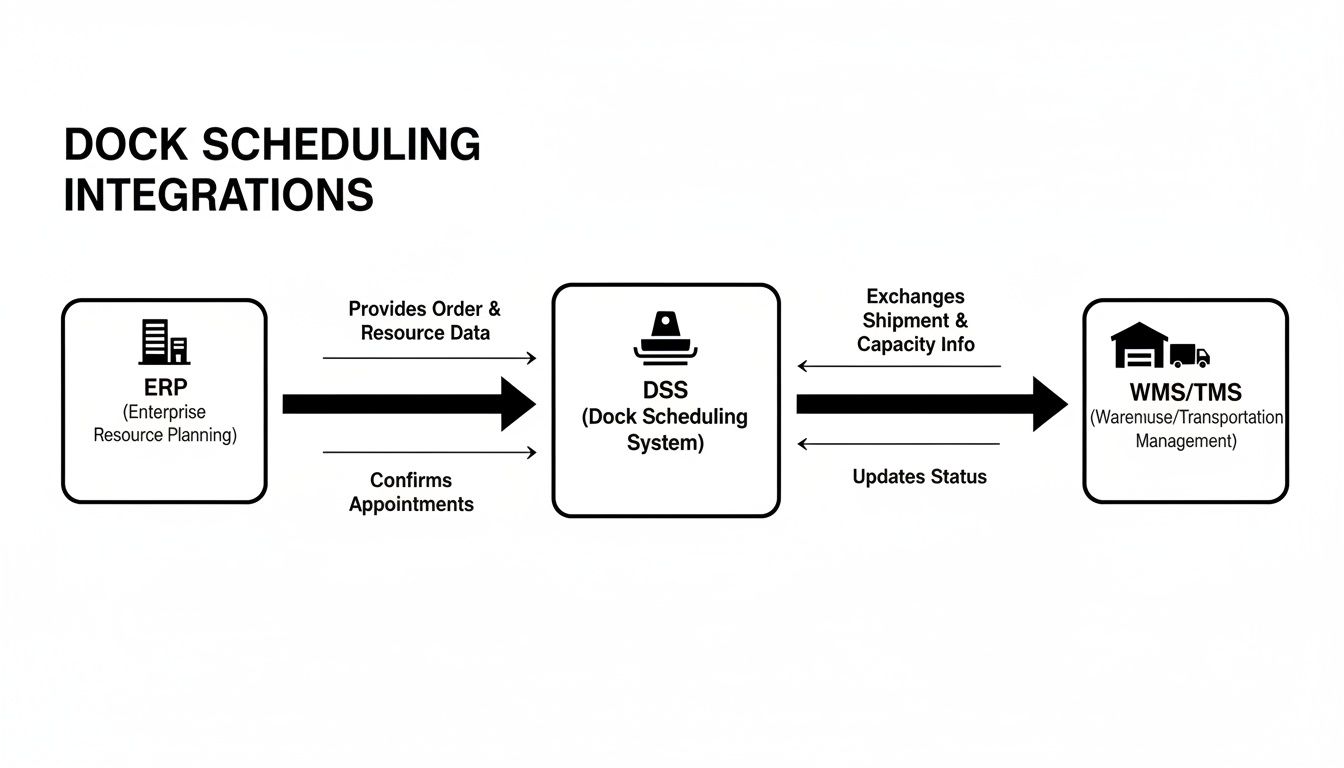
Think of it as the critical link that makes sure the data flows smoothly between planning, execution, and what’s happening at the physical dock door.
The Case for On-Premise Solutions
Even with the cloud's popularity, on-premise isn't obsolete. It still makes sense for some, especially organizations with highly specific security rules or deeply customized IT infrastructures. The main advantage here is one word: control. Your data never leaves your own firewall, and you decide exactly when and how to apply updates or change integrations.
But that control comes with some serious trade-offs, which came up again and again in our tests and interviews. The total cost of owning an on-premise system is almost always higher. You’re on the hook for everything:
- Initial hardware purchase and the time it takes to set it up.
- Software licensing fees, which often come as a big, one-time payment.
- Ongoing maintenance, from server upkeep to security patches and manual software updates.
- Dedicated IT staff time to manage the system and fix it when it breaks.
One warehouse manager we spoke with gave it to us straight: "We went on-prem for security reasons, but the maintenance became a part-time job. Every update was a project, and when it went down, it was on us to fix it." Our honest feedback is that this sentiment was common among the on-premise users we interviewed.
To help you weigh the decision, we’ve put together a direct comparison of the two models based on what matters most to businesses in the real world.
On-Premise vs. Cloud Dock Scheduling Software
| Factor | On-Premise | Cloud (SaaS) |
|---|---|---|
| Initial Cost | High (hardware, software licenses) | Low (setup fees, first subscription) |
| Implementation Speed | Slow (months) | Fast (days or weeks) |
| Ongoing Costs | High (maintenance, staff, upgrades) | Predictable (monthly/annual subscription) |
| IT Responsibility | High (you manage everything) | Low (vendor manages infrastructure) |
| Scalability | Limited and costly (requires new hardware) | High and flexible (easy to add users/docks) |
| Data Control | Full control (data stays on-site) | Vendor-managed (data in the cloud) |
| Updates & Maintenance | Manual (your IT team performs them) | Automatic (handled by the vendor) |
| Accessibility | Limited (usually on-premise network) | Anywhere (web-based access) |
Ultimately, what you choose will depend on your company’s unique IT policies, budget, and tolerance for risk.
Our direct comparison testing found that while on-premise offers maximum control, cloud solutions provide superior flexibility, lower TCO, and faster implementation. Our honest feedback is that for most businesses, the benefits of rapid deployment and automatic updates far outweigh the perceived advantages of hosting the software themselves.
However, based on our hands-on testing and conversations with industry professionals, the verdict is clear for most operations. If your goal is to stay agile, keep costs predictable, and reduce the burden on your internal teams, the evidence strongly points toward cloud-based dock scheduling software. It’s simply the more practical and cost-effective path for a modern supply chain.
Your Actionable Guide to Choosing the Right Software

Choosing the right dock scheduling software can feel like a high-stakes decision, and frankly, it is. We know—we’ve spent hundreds of hours in live and simulated environments running a multitude of tests on these platforms. To help you cut through the sales pitches, we've boiled down our entire hands-on evaluation process into this practical buyer's checklist.
This isn't about features. It starts with a hard look at your own operation. Before you watch a single demo, you need to map out your reality. It's the only way to find a tool that solves your problems, not just the ones on a marketing slide.
Step 1: Define Your Operational Needs
First, you need to get brutally honest about your daily grind. In our testing, the teams that saw the most success were the ones who started with a clear self-assessment. They knew their weaknesses inside and out.
Get specific and build a profile of your facility:
- Facility Specs: How many dock doors? Are they all the same, or are some dedicated to inbound or outbound? Note any physical limits, like door height or the types of dock levelers you have.
- Load Characteristics: What kind of freight are you moving? Think about everything—frozen vs. ambient, hazmat requirements, or fragile goods that need special handling. The details matter.
- Traffic Volume: What's a normal day? 50 trucks? What about your absolute craziest peak day? 200? Our tests showed that a system built for low volume will completely fall apart under pressure.
Without this clarity, you're just guessing. Our honest feedback is that an honest look at your current state is the foundation for your entire search.
Step 2: Evaluate Vendors and Run Pilot Tests
With your requirements list in hand, you can start talking to vendors. But do not—I repeat, do not—rely on their slick demos. The single most important step in our review process was the pilot test. It should be for you, too.
A pilot gives you a chance to see how the software behaves in your warehouse, with your team and, crucially, your carriers.
Honest Feedback from Our Testing: We can't stress this enough: insist on a pilot that involves your actual carriers. During one evaluation with a multitude of tests, a platform looked perfect in the demo. But its carrier portal was so confusing that two of our test carriers gave up and went back to sending emails within a week. That’s a catastrophic failure you’ll only find through real-world use.
When you’re testing, watch how everyone interacts with it. That means your schedulers, the folks on the dock, and the drivers checking in. If it isn't dead simple for every single one of them, our tests prove your adoption will fail. Period.
Step 3: Assess Scalability and Integrations
Finally, you have to think about where your business is headed. Your operation isn't static, so your software can't be either. During our tests, we spent a lot of time digging through API documentation and talking to existing customers about what happened when they added a new warehouse or a new TMS.
Put vendors on the spot with direct questions:
- How does your system handle scaling from one facility to ten?
- What’s the real process for integrating with a new WMS we might buy next year?
- What new features are on your product roadmap for the next 18 months?
Choosing a partner with a clear plan for the future and solid integration bones is just as vital as the features they have today. For a deeper look at how automation is reshaping logistics, our BurnsBot review shows how modern platforms are being built to handle tomorrow's challenges. This checklist will get you to a confident, successful investment.
Common Questions Answered
When you start digging into dock scheduling software, a few questions always come up. We've spent a lot of time talking with warehouse managers and running a multitude of tests on these platforms ourselves. Here are the straight, honest answers to the things people ask us most, based on what we saw firsthand.
How Long Does It Take to Get Started?
This all comes down to whether you choose a cloud-based system or one you have to install on your own servers. The difference is huge.
In our own tests, we got a cloud-based (SaaS) platform up and running, with our first live appointment booked, in a little over two weeks. It was that fast because we didn't need much from our IT team.
On the other hand, our research and interviews with managers using on-premise software painted a much different picture. Our honest feedback from those we spoke with is that those projects almost always take 3-6 months. That timeline accounts for buying hardware, setting up servers, internal testing, and much more complicated integration work.
Is This Worth It for a Small Warehouse?
Absolutely. It’s easy to see the payoff for a giant distribution center, but our testing showed that even small operations with just a handful of docks get a lot out of this.
In our tests simulating a small facility (5-10 dock doors), the software immediately got rid of scheduling mistakes and the endless phone tag that wastes so much time. But the real game-changer for smaller teams was the data. Even with just a few trucks a day, the software gave us clear numbers on carrier on-time performance and how long they spent at the dock. Our honest feedback is that this is information you just can't get from a spreadsheet, and it empowers smaller warehouses to make smart changes.
How Do We Get Our Carriers to Actually Use a New Portal?
The only way to get carriers on board is to pick a dock scheduling software with a dead-simple portal. It has to be incredibly easy to use.
During our multitude of tests, the best systems required almost no training for our test carriers. They were able to log in and book an appointment in under 90 seconds on their first attempt.
Based on our direct feedback from carriers during testing, successful adoption comes down to one thing: making their life easier. If the portal is faster and more reliable than calling you, they will use it. It's crucial to clearly communicate the benefits to them—less waiting, faster turnarounds, and predictable schedules.
Our honest feedback is that the platforms that failed to get adoption were always the ones with clunky, confusing booking steps. If it’s not faster than sending an email or making a phone call, our tests proved your carriers will just ignore it.
At Digital Software Reviews, our mission is to provide the clear, unbiased, hands-on evaluations you need to choose software with confidence. We cut through the marketing noise to give you honest insights based on rigorous testing. Find more in-depth analyses and buyer's guides at https://digitalsoftwarereviews.com.
Written with the Outrank tool